
Routing Rules
Routing Rules decide which Chain should handle each Alert Instance.
Open Routing Rules to create and manage rules.
What a Routing Rule does
An alert can only enter escalation after 1stLine knows which path should handle it.
That is the role of a Routing Rule:
- read extracted alert fields
- check whether its conditions match
- if they do, send the Alert Instance to the selected Escalation Chain
If no Routing Rule matches, the Alert Instance stays Orphan. In practice, that usually means the schema extracted the alert correctly, but no escalation path has claimed it yet.
What a Routing Rule includes
On Create Routing Rule and Routing Rule Details, the main fields are:
- Name
- Escalation Chain
- Respect Conditions
- Routing Conditions
Escalation Chain
Escalation Chain is the target path for matching alerts.
The rule does not define the escalation path itself. It only selects which Chain should be used.
That means a good rule is usually paired with a clearly named Chain such as:
- Payments Production
- Platform Critical
- Customer Support Fallback
Respect Conditions
Respect Conditions controls how the rule reads its conditions:
- Match ALL conditions
- Match ANY condition
- Is not
Use Match ALL conditions when the rule should only claim alerts that meet a full set of checks. Use Match ANY condition when one of several acceptable matches should route to the same Chain.
Routing Conditions
Each Routing Condition includes:
- Field
- Operator
- Value
- optional schema scope
- optional Is Priority
Supported operators include:
- Equals
- Contains
- Starts with
- Ends with
- Matches (Regex)
- Greater than
- Less than
- Greater than or equal to
- Less than or equal to
Schema scope
Use schema scope when the same field name exists across multiple schemas but should only be matched for one of them.
If your organization has only one relevant schema for that route, leaving schema scope broad can keep the rule simpler.
Is Priority
Use Is Priority when the condition should evaluate the value as alert priority instead of as a plain string comparison.
This matters most with operators such as Greater than, Less than, Greater than or equal to, and Less than or equal to. With Is Priority enabled, 1stLine compares P priority values such as P1, P2, and P3 as priorities, not as plain text.
How to design useful Routing Rules
Good Routing Rules usually follow these principles:
- route by stable fields, not noisy ones
- keep one rule focused on one clear path
- start broad while validating the flow
- narrow the conditions only after the Chain works end to end
Common first matches include:
- service or component name
- environment
- status or severity
- known labels extracted by the schema
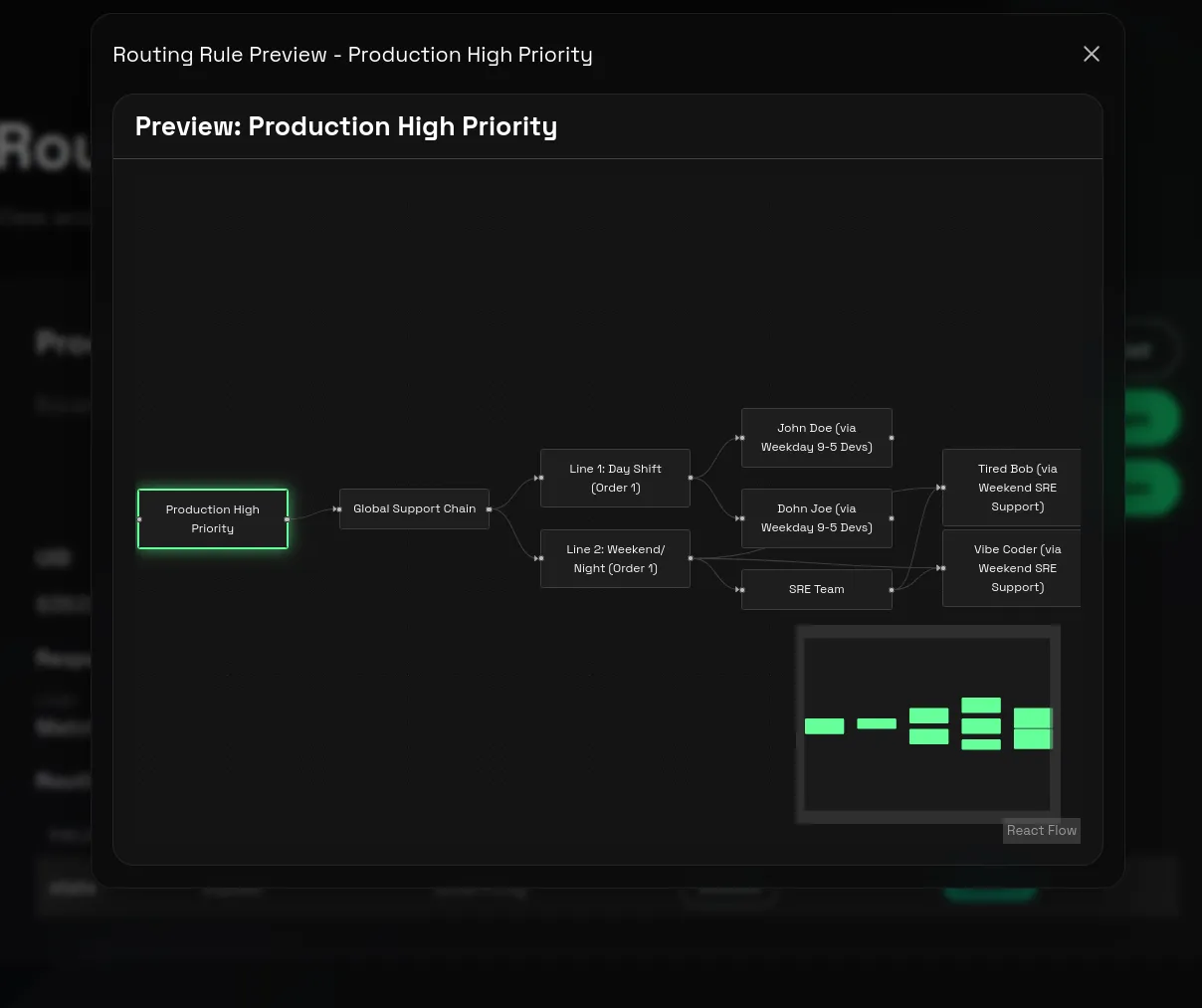
Previewing the result
The Routing Rule details page includes:
- View Chain
- Preview Escalation
Use View Chain to confirm you selected the intended path. Use Preview Escalation to check the structure of the resulting path before testing with real alerts.
From a Routing Rule, Preview Escalation helps answer one key question: if this rule claims the alert, what path will 1stLine actually follow?
It shows the selected Chain and the connected escalation steps so you can verify the rule is pointing to the right path before sending a live alert.
Use it every time you change the rule target or adjust Routing Conditions in a way that could send alerts into a different path.
Practical setup order
For a clean first setup:
- Create the target Chain first.
- Confirm the needed fields already exist in the Alert Schema.
- Create one Routing Rule with broad conditions.
- Send a real test alert.
- Confirm the Alert Instance is no longer Orphan.
- Use Preview Escalation to confirm the displayed path still matches the intended Chain.
- Tighten the conditions once the path is working.
Related pages
- Escalation
- Chains
- Lines and Line Members
- Guide: Multiple Chains vs Multiple Lines
- Schema Patterns for examples of fields you can use in Routing Rule conditions.