
Chains
A Chain is the escalation path that 1stLine follows after a matching Routing Rule sends an Alert Instance into escalation.
Open Escalation Chains to create and manage Chains.
What a Chain does
A Chain answers one practical question: once an alert is routed here, what should happen next?
In most setups, a Chain does not contact people by itself. Instead, it gives 1stLine the structure for the next steps:
- which Lines belong to this escalation path
- in which order those Lines should be used
- which Line Members are available inside each Line
- which Chain Conditions can influence the flow
That separation matters. A Routing Rule decides which alerts should enter a path. The Chain defines what that path is.
When to create a separate Chain
Create a separate Chain when the escalation path is meaningfully different, for example:
- one service should go to a different responder group than another
- production alerts should follow a different path than non-production alerts
- one class of alerts needs a shorter or more aggressive path
- one team needs a dedicated path that should stay independent from other teams
If the responders are mostly the same and only one step changes, it is usually better to keep one Chain and adjust the Lines inside it. See Multiple Chains vs Multiple Lines for a practical way to decide.
How Chains connect to the rest of 1stLine
The path is:
- An Alert Producer sends an alert.
- An Alert Schema extracts the fields.
- A Routing Rule matches the Alert Instance.
- The Routing Rule selects one Chain.
- 1stLine follows that Chain through its Lines and Line Members.
So a Chain sits between routing and actual responder assignment.
Chain configuration
On Create Escalation Chain and Escalation Chain Details, the main fields are:
- Name
- Description
- Respect Conditions
- Chain Conditions
Respect Conditions
Respect Conditions controls how the Chain reads its condition list:
- Match ALL conditions means every condition must match
- Match ANY condition means a single matching condition is enough
- Is not inverts the result
This is useful when you want one Chain to behave differently only for a defined set of alerts, priorities, or time windows.
Chain Conditions
Chain Conditions use the same general condition model as Routing Rules, but they apply inside the Chain logic instead of selecting the Chain itself.
The editor supports:
- Field
- Operator
- Value
- Is Priority
- Is Time
When Is Priority is enabled, operators such as Greater than, Less than, Greater than or equal to, and Less than or equal to compare P priority values such as P1, P2, and P3 as priorities instead of as plain text.
Supported operators include:
- Equals
- Contains
- Starts with
- Ends with
- Matches (Regex)
- Greater than
- Less than
- Greater than or equal to
- Less than or equal to
Use Chain Conditions when the escalation path needs logic inside the path, not when you are deciding which path to use in the first place.
Previewing the Chain
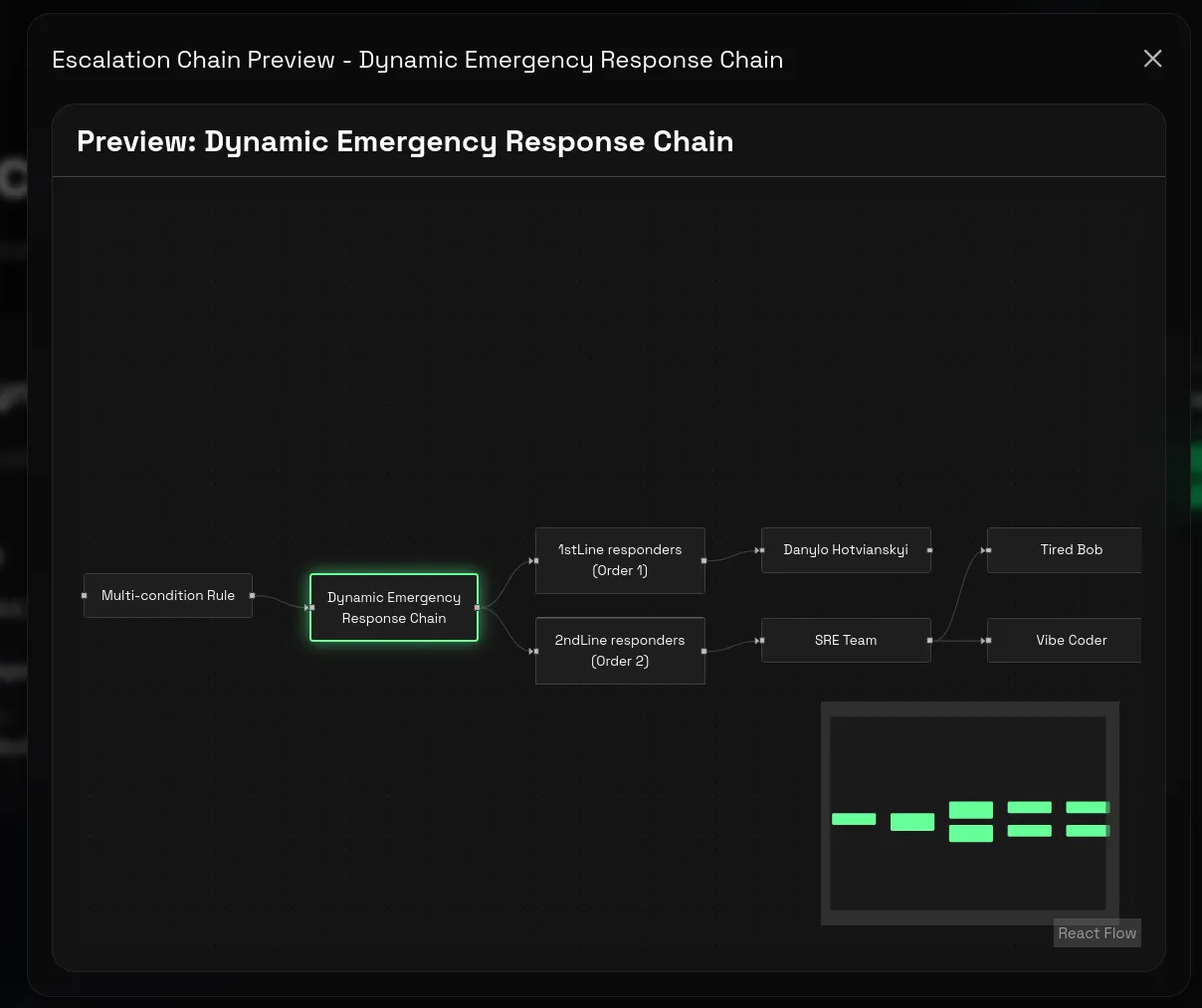
The Chain details page includes Preview Escalation.
Use it to check that the Chain is connected to the Lines you expect before sending a real alert.
It shows the escalation path structure for that Chain, including the Chain itself, the connected Lines, and how the path should move from one step to the next.
In practice, this is the fastest way to confirm that the Chain is shaped the way responders will actually experience it.
This is especially useful after changing line order, adding new backup Lines, or reworking conditions.
Recommended setup pattern
For a first working Chain:
- Start with one clear purpose for the Chain.
- Add the minimum Lines needed for that path.
- Keep Conditions broad until the path works end to end.
- Use Preview Escalation to confirm the displayed path matches what you intended.
- Only then make the Chain more specific.
That sequence keeps debugging simpler. When a path is not working yet, broad conditions and a short Chain make it much easier to see where the issue is.
Related pages
- Escalation
- Routing Rules
- Lines and Line Members
- Schedules
- Guide: 24/7 Escalation Coverage with Backups
- Core Concepts for a broader explanation of how alerts move through 1stLine.