
Schema Patterns
Schema Patterns tell 1stLine how to extract useful fields from raw Alert Events.
An Alert Producer often sends the important data in a shape that is not ready for routing. Sometimes the data is already clean JSON. Sometimes it is hidden inside a text block, embedded message, label list, annotation list, XML body, or receiver-specific payload.
Schema Patterns turn that raw payload into fields 1stLine can use for:
- Routing Conditions
- Communication Conditions
- Fingerprint Fields
- Schema Resolution Mapping
- Schema Acknowledgement Mapping
- Schema Lifecycle Mapping
- Schema Transformations
The goal is not to extract everything. The goal is to extract the fields that help 1stLine decide what the alert is, who should handle it, how urgent it is, how repeated events should be grouped, and how updates should be sent back.
The extraction model
1stLine processes Schema Patterns as field definitions.
Each pattern describes one field you want to create or update. A pattern can read from the incoming payload directly, or it can read from a value extracted by an earlier pattern.
This enables a common two-step flow:
- Extract a larger text section, such as a
Labels:block. - Extract individual keys from that section, such as
priority,service, orinstance.
After extraction, the resulting fields are available to the rest of 1stLine.
For example, a raw payload may contain:
{ "text": "Alert: CPU high\nLabels:\n- service = checkout\n- priority = P1\n- instance = prod-1\nAnnotations:\n- summary = CPU above threshold"}Schema Patterns can turn it into fields such as:
{ "title": "CPU high", "labels": { "service": "checkout", "priority": "P1", "instance": "prod-1" }, "summary": "CPU above threshold"}Now labels.priority, labels.service, and summary can be used in Conditions, mappings, and transformations.
What to extract first
Start with fields that answer operational questions:
- What is affected?
- How urgent is it?
- What should the responder read first?
- Which team or Chain should receive it?
- What makes this alert the same as a previous Alert Event?
- Which field indicates the alert is resolved?
- Which receiver field should get action links?
For a first schema, useful fields often include:
titleormessagesummaryordescriptionprioritystatusservicesourcelabelsortagsdashboard,runbook,silence, or similar links when present- a stable identifier for Fingerprint Fields
Avoid extracting unstable values such as timestamps, random run IDs, request IDs, or generated message IDs unless they are truly part of the alert identity.
Pattern fields
A Schema Pattern can define:
name: the extracted field name.type: the extracted value type.description: what the field means.sourceField: where to read from.sourcePattern: how to extract from that source.children: nested fields when extracting an object.dictionary: dynamic key-value extraction.fallbacks: ordered backup extraction attempts for the same field.
Supported field types:
stringnumberbooleanobjectarraydictionary
Use dictionary for dynamic labels or tags where the keys can vary between alerts.
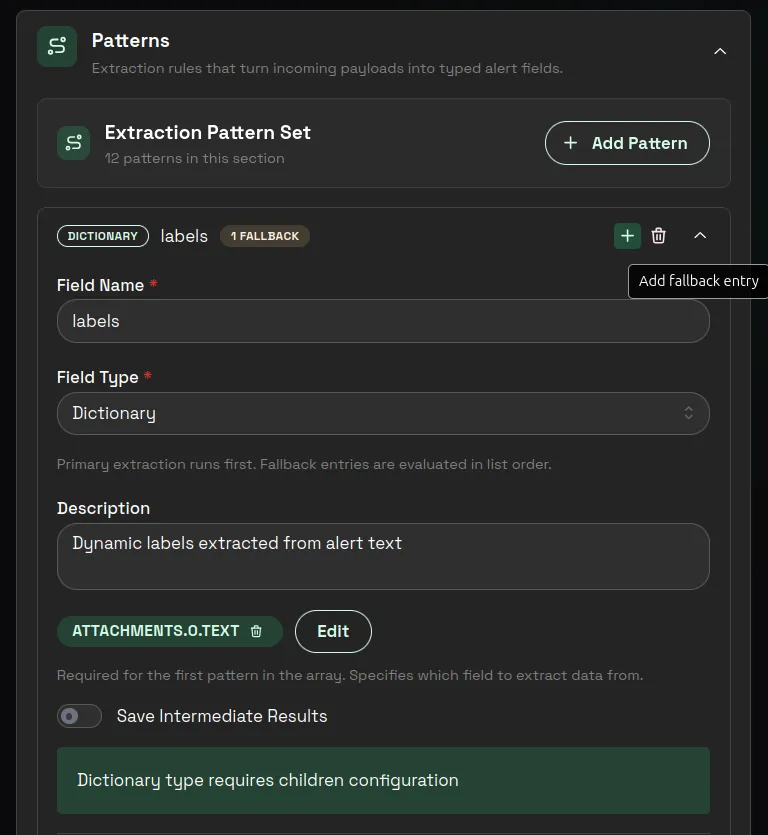
In the UI, use Add Pattern inside Extraction Pattern Set to create the field you want 1stLine to produce. If the same field can appear in another place, use Add fallback entry on that pattern row to add another extraction attempt for the same field.
1stLine tries the primary pattern first, then each fallback entry in order, and stops at the first successful extraction. A field can have up to three total extraction attempts: the primary pattern plus fallback entries.
Source fields
sourceField tells 1stLine where to read from.
If the incoming payload is:
{ "message": { "text": "priority=P1 service=checkout" }}Then sourceField can point to:
message.textUse sourceField whenever the value you need is inside a specific part of the payload.
If a later pattern should read from a field extracted by an earlier pattern, point sourceField to that extracted field.
Choosing a pattern type
Choose the pattern type based on the shape of the source value.
The examples in this section were validated with Test Pattern Extraction in 1stLine.
Use this quick choice guide:
| Source value shape | Pattern type to try first | Why |
|---|---|---|
| A normal JSON field or nested object | json_extract | It reads structured data without parsing text. |
Repeated key-value lines such as priority = P1 | keyPairRegex | It can turn many labels or tags into a dictionary. |
| A specific value inside a larger text message | regex | It can capture one title, status, URL, or section. |
| A stable delimiter such as commas or new lines | split | It works when the order and delimiter are predictable. |
| XML or HTML-like content | xpath | It reads structured XML or HTML-style payloads. |
JSON Extract
Use json_extract when the data is already structured JSON.
Best for:
- top-level payload fields
- nested JSON objects
- JSON stored as a string
- labels or annotations already sent as objects
Example source:
{ "labels": { "service": "checkout", "priority": "P1" }}Use JSON extraction when possible. It is usually clearer and safer than text parsing.
Validated examples:
- Extract one nested object from a JSON string.
Pattern:
{ "name": "labels_object", "type": "object", "sourceField": "metadata", "sourcePattern": { "type": "json_extract", "config": { "jsonPath": "$.labels", "parseAsJson": true } }}Payload:
{ "metadata": "{\"labels\":{\"alertname\":\"TestAlert\",\"severity\":\"critical\",\"instance\":\"web-01\"},\"annotations\":{\"summary\":\"CPU high\"}}"}Result:
{ "labels_object": { "alertname": "TestAlert", "severity": "critical", "instance": "web-01" }}- Extract one nested value from a JSON string.
Pattern:
{ "name": "severity_value", "type": "string", "sourceField": "metadata", "sourcePattern": { "type": "json_extract", "config": { "jsonPath": "$.labels.severity", "parseAsJson": true } }}Result:
{ "severity_value": "critical"}- Extract all keys from one JSON object level with
*.
Pattern:
{ "name": "all_labels", "type": "object", "sourceField": "metadata", "sourcePattern": { "type": "json_extract", "config": { "jsonPath": "$.labels.*", "parseAsJson": true } }}Result:
{ "all_labels": { "alertname": "TestAlert", "severity": "critical", "instance": "web-01" }}Key Pair Regex
Use keyPairRegex when the payload contains repeated key-value lines.
Best for:
- labels in text
- tags in text
- annotation blocks
- custom metadata sections
Example source:
Labels:- service = checkout- priority = P1- instance = prod-1This should usually become a dictionary, so Conditions can use values such as labels.service and labels.priority.
Validated examples:
- Extract all key-value pairs into one object.
Pattern:
{ "name": "all_pairs", "type": "object", "sourceField": "pairs", "sourcePattern": { "type": "keyPairRegex", "config": { "pattern": "(?<key>[^:\\n]+):\\s*(?<value>[^\\n]+)", "flags": "g", "trimValues": true } }}Payload:
{ "pairs": "team: payments\nservice: checkout\npriority: P1"}Result:
{ "all_pairs": { "team": "payments", "service": "checkout", "priority": "P1" }}- Extract the first matched value into one string field.
Pattern:
{ "name": "team", "type": "string", "sourceField": "pairs", "sourcePattern": { "type": "keyPairRegex", "config": { "pattern": "(?<key>[^:\\n]+):\\s*(?<value>[^\\n]+)", "flags": "g", "trimValues": true } }}Result:
{ "team": "payments"}- Extract dynamic labels from a larger text block with a chained dictionary pattern.
Patterns:
[ { "name": "labels_raw", "type": "string", "sourceField": "attachments.0.text", "sourcePattern": { "type": "regex", "config": { "pattern": "Labels:\\n(?<extract>.*?)(\\nAnnotations:|\\nSilence:|\\z)", "flags": "s" } } }, { "name": "labels", "type": "dictionary", "sourceField": "labels_raw", "dictionary": { "type": "string", "sourcePattern": { "type": "keyPairRegex", "config": { "pattern": "^\\s*-\\s*(?<key>[^=\\s]+)\\s*=\\s*(?<value>.+)$", "flags": "m", "extractAll": true, "trimValues": true } } } }]Payload:
{ "attachments": [ { "text": "Labels:\n - alertname = TestAlert\n - severity = critical\n - instance = web-01\nAnnotations:\n - summary = Notification test\nSilence: http://localhost:3000" } ]}Result:
{ "labels_raw": " - alertname = TestAlert\n - severity = critical\n - instance = web-01", "labels": { "alertname": "TestAlert", "severity": "critical", "instance": "web-01" }}- Extract custom key-value formats, not only
key = value.
Patterns:
[ { "name": "custom_labels_raw", "type": "string", "sourceField": "metadata", "sourcePattern": { "type": "regex", "config": { "pattern": "Labels:\\n(?<extract>.*?)(\\nEnd|\\z)", "flags": "s" } } }, { "name": "custom_labels", "type": "dictionary", "sourceField": "custom_labels_raw", "dictionary": { "type": "string", "sourcePattern": { "type": "keyPairRegex", "config": { "pattern": "^__(?<key>[^_]+)__-(?<value>[^;]+);$", "flags": "m", "extractAll": true, "trimValues": true } } } }]Payload:
{ "metadata": "Labels:\n__foo__-bar;\n__john__-Doe;\nEnd"}Result:
{ "custom_labels_raw": "__foo__-bar;\n__john__-Doe;", "custom_labels": { "foo": "bar", "john": "Doe" }}Regex
Use regex when you need to extract a specific value or section from text.
Best for:
- a title inside a larger text field
- a status marker such as
FIRINGorRESOLVED - a section between two known headings
- a URL embedded in text
Keep regex patterns scoped. A pattern that can match too much text will create unreliable Conditions.
Validated examples:
- Extract one alert title.
Pattern:
{ "name": "title", "type": "string", "sourceField": "text", "sourcePattern": { "type": "regex", "config": { "pattern": "Alert:\\s*(?<extract>[^\\n]+)" } }}- Extract one status value.
Pattern:
{ "name": "status", "type": "string", "sourceField": "text", "sourcePattern": { "type": "regex", "config": { "pattern": "Status:\\s*(?<extract>\\w+)" } }}- Extract one URL.
Pattern:
{ "name": "runbook", "type": "string", "sourceField": "text", "sourcePattern": { "type": "regex", "config": { "pattern": "Runbook:\\s*(?<extract>https?://[^\\s]+)" } }}Payload:
{ "text": "Alert: CPU high\nStatus: FIRING\nRunbook: https://example.com/runbook\nDashboard: https://example.com/dashboard"}Result:
{ "title": "CPU high", "status": "FIRING", "runbook": "https://example.com/runbook"}- Use numbered capture groups when you need several parts.
Pattern:
{ "name": "host_port", "type": "object", "sourceField": "endpoint", "sourcePattern": { "type": "regex", "config": { "pattern": "([^:]+):(\\d+)" } }}Payload:
{ "endpoint": "checkout-api:443"}Result:
{ "host_port": { "1": "checkout-api", "2": "443" }}- Use named capture groups when you want clearer keys.
Pattern:
{ "name": "alert_and_state", "type": "object", "sourceField": "headline", "sourcePattern": { "type": "regex", "config": { "pattern": "\\[(?<state>[^\\]]+)\\]\\s*(?<name>.+)" } }}Payload:
{ "headline": "[FIRING] CPU high"}Result:
{ "alert_and_state": { "state": "FIRING", "name": "CPU high" }}Split
Use split when a text field has a stable delimiter.
Best for:
- comma-separated values
- newline-separated values
- simple fixed-position text
Avoid split when the number or order of parts can change.
Validated examples:
- Split comma-separated text into an object.
Pattern:
{ "name": "csv_parts", "type": "object", "sourceField": "data", "sourcePattern": { "type": "split", "config": { "delimiter": ",", "trimValues": true } }}Payload:
{ "data": "John Doe, Software Engineer, New York, 30"}Result:
{ "csv_parts": { "0": "John Doe", "1": "Software Engineer", "2": "New York", "3": "30" }}- Split new lines and keep only non-empty values.
Pattern:
{ "name": "lines", "type": "object", "sourceField": "multiline", "sourcePattern": { "type": "split", "config": { "delimiter": "\n", "trimValues": true } }}Payload:
{ "multiline": "alpha\n beta \n\ngamma"}Result:
{ "lines": { "0": "alpha", "1": "beta", "3": "gamma" }}- Use split with a
stringfield when you want the first value.
Pattern:
{ "name": "first_path", "type": "string", "sourceField": "path", "sourcePattern": { "type": "split", "config": { "delimiter": "/", "trimValues": true } }}Payload:
{ "path": "prod/checkout/api"}Result:
{ "first_path": "prod"}XPath
Use xpath when the payload contains XML or HTML-like content.
Best for:
- XML alert payloads
- HTML snippets with meaningful elements
- structured text that is not JSON
Validated examples:
- Extract the full XML block for one element.
Pattern:
{ "name": "alert_block", "type": "string", "sourceField": "xmlData", "sourcePattern": { "type": "xpath", "config": { "xpath": "//alert", "returnText": false } }}- Extract one text value with a global selector.
Pattern:
{ "name": "title", "type": "string", "sourceField": "xmlData", "sourcePattern": { "type": "xpath", "config": { "xpath": "//title", "returnText": true } }}- Extract one text value with a full path.
Pattern:
{ "name": "severity", "type": "string", "sourceField": "xmlData", "sourcePattern": { "type": "xpath", "config": { "xpath": "/root/alert/severity", "returnText": true } }}Payload:
{ "xmlData": "<root><alert><title>CPU high</title><severity>critical</severity><service>checkout</service></alert></root>"}Result:
{ "alert_block": "<alert><title>CPU high</title><severity>critical</severity><service>checkout</service></alert>", "title": "CPU high", "severity": "critical"}- Extract repeated XML elements into an object.
Pattern:
{ "name": "all_instances", "type": "object", "sourceField": "xmlData", "sourcePattern": { "type": "xpath", "config": { "xpath": "instance", "returnText": true } }}Payload:
{ "xmlData": "<root><instance>web-01</instance><instance>web-02</instance><service>checkout</service></root>"}Result:
{ "all_instances": { "instance_0": "web-01", "instance_1": "web-02" }}Chaining patterns
Chaining means one pattern extracts an intermediate value and another pattern extracts useful fields from that value.
Example: extract labels from a larger text block.
Raw payload:
{ "text": "Alert: CPU high\nLabels:\n- service = checkout\n- priority = P1\nAnnotations:\n- summary = CPU above threshold"}Step 1: extract the labels section from text.
{ "name": "labels_raw", "type": "string", "sourceField": "text", "sourcePattern": { "type": "regex", "config": { "pattern": "Labels:\\n(?<extract>.*?)(\\nAnnotations:|$)", "flags": "s" } }}Step 2: extract key-value pairs from labels_raw.
{ "name": "labels", "type": "dictionary", "sourceField": "labels_raw", "dictionary": { "type": "string", "sourcePattern": { "type": "keyPairRegex", "config": { "pattern": "^\\s*-\\s*(?<key>[^=]+?)\\s*=\\s*(?<value>.+)$", "flags": "m", "extractAll": true, "trimValues": true } } }}The result can include:
{ "labels": { "service": "checkout", "priority": "P1" }}Fallback patterns
Use fallback patterns when the same field can appear in more than one place.
Example: priority may be a top-level field in one Alert Event and a label in another.
A good fallback strategy keeps one business meaning:
priority = the urgency value 1stLine should use for routingThen it tries several possible extraction paths for that same meaning.
Use fallbacks for real producer variation, not for guessing. If a fallback can extract the wrong value, it is worse than leaving the field empty.
1stLine evaluates the primary pattern first and then evaluates fallback entries in order until one extraction attempt succeeds.
In the current UI, one field can include up to two fallback entries. Keep them in business order: the most trusted extraction path first, then the next most trusted fallback.
Good examples:
priorityfirst fromlabels.priority, then frommessagetextservicefirst from a structured JSON field, then from a key-value text blocktitlefirst from a dedicated title field, then from a summary line inside a larger message
Bad examples:
- mixing different business meanings in one field
- using a broad fallback that can capture unrelated text
- adding fallbacks just to avoid an empty field in tests
Pattern testing
Test Schema Patterns before using them in live Routing Rules.
- Open Alert Schemas.
- Select your schema with View.
- Open Test Pattern Extraction.
- Paste a realistic Alert Payload.
- Click Test Patterns.
- Check Extracted Data.
- Use Extraction Steps to understand how each field was produced.
- Compare the result with the fields you need for Conditions and mappings.
If a field uses fallbacks, make sure the extraction test proves the right attempt is winning for the payload you are testing.
Do not treat a schema as ready just because the pattern test succeeds. The extracted fields still need to be useful.
Ask:
- Can Routing Rules match on these fields?
- Can Communication Rules use these fields?
- Can Fingerprint Fields deduplicate repeated Alert Events correctly?
- Can resolution events be detected?
- Can acknowledgement, resolution, and incident links be injected where the receiver can show them?
Practical extraction checklist
Before you finish a schema, confirm:
titleormessageis human-readable.summaryordescriptionexplains the issue.priorityis extracted only from real producer data.labelsortagspreserve dynamic key-value data.- Fingerprint Fields use stable identity fields.
- Resolution Patterns match resolved Alert Events, not firing events.
- action-link mappings point to fields the receiver will display.
- Transformation Template uses fields that appear in Extracted Data.
Common mistakes
Do not extract every payload key. More fields do not automatically make a better schema.
Do not use timestamps, random IDs, or generated message IDs as Fingerprint Fields unless they are part of the alert identity.
Do not build Conditions on fields that only appear in one rare payload example.
Do not use broad regex patterns that can match unrelated text.